
In today’s tech-savvy world, the potential of smart home systems is expanding rapidly, providing homeowners with a realm of possibilities for automation and convenience. With just a finger tap, you can optimize your living environment, ensuring comfort, security, and efficient usage of various devices. This article will explore easy steps to help you get started on your smart home journey, emphasizing tools and systems that seamlessly integrate into your daily life.
- Identify your core needs and prioritize devices for security, lighting, and climate to create a focused smart home plan.
- Choose a compatible hub that integrates your devices, supports preferred protocols, and fits your existing ecosystem.
- Select devices that work together and research protocols like Zigbee, Z-Wave, and Wi-Fi for reliable connectivity.
- Create automation routines via apps, enable strong security practices, and update firmware for safe, efficient daily use.


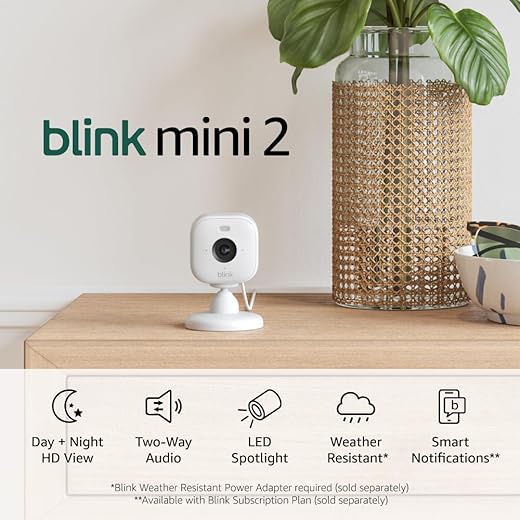

Getting started with smart home technology may seem daunting, but with the right approach, it can be one of the easiest transitions you make. For instance, mounting a smart doorbell allows you to monitor your front door from anywhere, bringing peace of mind to your community. Additionally, you can easily control your music, lighting, and cooling systems, creating specific scenarios that enhance your home’s ambiance. Using intuitive interfaces like HomeKit can simplify this process even further.
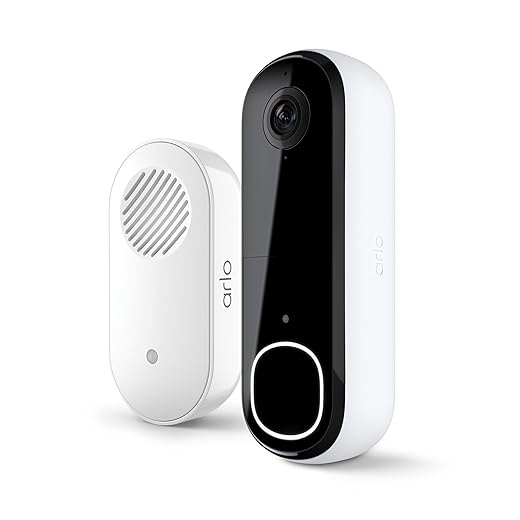
Automation works best when tailored to your specific needs, so it’s essential to pick the right brand and software that caters to your preferences. Most systems include features like two-factor authentication, thus protecting your home from potential issues. This step-by-step guide will not only cover the basics but will also provide insights into usage that can save you money and time as you embrace intelligent tech solutions.
As you embark on this journey of unboxing and integrating new devices into your home, expect gradual changes that will turn your living space into a well-coordinated smart environment. Whether you’re a technology enthusiast or a homeowner looking to streamline daily tasks, these common scenarios will ensure that your smart home works efficiently for you.
Step-by-Step Guide to Smart Home Setup
Setting up your smart home technology can seem daunting, but with the right guidance, it can be a smooth process. Start by identifying your basic needs and desired features. This will allow you to categorize the devices that best match your lifestyle. For instance, if safety is a priority, consider adding smart security cameras like the Ring Spotlight Cam or the Arlo Pro 4. These devices ensure the safety of your home, allowing you to monitor your property remotely.
Next, focus on installation. Many smart devices today are plug-and-play, meaning you can install them in seconds without needing professionals. However, for more complex systems like a smart thermostat or entire home automation dashboards, you may want to consult with experts. Companies like Nest and Ecobee provide additional resources and open-source options to help simplify the setup process.
Once installed, it’s time to enhance the functionality of your devices. Look for devices that allow for flexible routines. For example, the Philips Hue smart bulbs enable you to manage your lighting remotely and set various moods through streaming features. Integrating these devices effectively can create an efficient smart home environment that aligns with your personal preferences.
Improving your smart home functionality doesn’t end at installation. Regularly exploring other sources for updates and tutorials can keep you informed on maximizing your setup. Routines can be easily adjusted to fit your activities throughout the day, ensuring your home remains a perfect companion for your lifestyle. Furthermore, understanding how to use advanced features will help you stay ahead of the complexity curve.
In conclusion, setting up your smart home is about identifying your required features, efficiently managing placement, and streamlining your daily routines. We’ve outlined the steps to take from start to finish, including the right products to consider. With the right approach, your smart home can be complete within your desired timeframe, enhancing your overall convenience and comfort.
Choosing Your Smart Home Hub
When starting your smart home journey, picking the right hub is crucial. The hub acts as a central system linking all your smart devices, making your home smarter and more efficient. They come in many shapes and functionalities, so it’s essential to choose one that suits your needs. For example, products from Amazon, such as the Echo Plus, not only serve as a speaker but also perform as an effective hub, integrating various devices for seamless control.
While exploring different options, consider how well the hub’s software fits into your existing setup. Older models may lack the accessibility or features needed for expanded functionality. It’s worth taking the time to read reviews and maybe even check with professional installers or electricians on which products can best meet your requirements. The right hub can help adjust your home’s climate, control lighting, and provide security–all with a simple voice command or through a user-friendly app.
Some companies offer hubs with vibrant colors and designs that enhance your home decor while making technology more approachable. This can simplify your experience and make your home more inviting. Consider hubs that allow offline functionality, ensuring you stay connected even when the internet goes down. Smart hubs like the Samsung SmartThings offer versatile access to a wide range of devices from different brands, making linking them a breeze.
Ultimately, choosing your smart home hub is about making informed decisions based on your unique needs. Explore the offerings carefully; the right pick will not only streamline your daily routines but also open doors to expanding your smart home capabilities in the future. As technology continues to evolve, staying up to date will ensure your system remains efficient and effective in meeting your family’s demands.
Selecting Compatible Devices
When embarking on your journey to set up a smart home, selecting compatible devices is a crucial aspect that can greatly affect your experience. The concept of compatibility matters because it ensures that all your devices can communicate effectively with each other. As a homeowner, you will want to choose products that work together seamlessly to create a comfortable and efficient environment in every room, including your bedroom.
To get started, consider the ecosystems in which your devices will operate. Some brands offer universal hubs that allow for greater automation across different devices. For instance, you might want to consider an Amazon Echo (available on Amazon) as it works well with various brands and can assist with your daily routines. Before you make any purchases, it’s a good idea to consult guides and test compatibility through various applications that provide an explanation of how different devices interact. This will save you time and make the installation process much smoother.
Additionally, think about how each device will fit into your overall plans. For example, if you’re focusing on cooling solutions, a smart thermostat like the Nest Learning Thermostat (found on Amazon) can be a great choice. It automates temperature settings based on your routines and can adjust the climate in your bedrooms to your liking. The color of the device might also matter if you’re aiming for a particular aesthetic in your home.
It’s really not difficult to set up a smart home with the right guidance. Start by identifying what you need to automate and where those devices will be placed. Experts recommend starting small; you can always expand your setup by adding more devices as you feel comfortable. Whether you’re gambling on new technology or sticking to proven brands, remember that a cloud-free approach may benefit your privacy and performance.
| Device | Brand | Compatibility | Link |
|---|---|---|---|
| Smart Thermostat | Nest Learning Thermostat | Wi-Fi | View on Amazon |
| Smart Hub | Samsung SmartThings | Universal | View on Amazon |
| Smart Assistant | Amazon Echo | Multiple Brands | View on Amazon |
Understanding Wireless Protocols
In today’s modern smart home, understanding wireless protocols is crucial for ensuring a seamless and efficient environment. Many devices, from smart speakers to security cameras, rely on these protocols to communicate with each other over the internet. There are a few standard protocols that are typically used in smart homes, including Zigbee, Z-Wave, and Wi-Fi. Each has its own characteristics, which can affect the status and performance of your chosen devices.
For instance, Zigbee is ideal for small sensors and devices that require minimal power. It operates on a mesh network that lets devices communicate even when they are not in direct range of the hub. This is great for monitoring the brightness of your smart bulbs or managing your thermostat settings with a Nest Learning Thermostat. Z-Wave offers similar functionality but is often preferred for its two-factor security options, which can help protect your data. Users should research these protocols to pick the best option for their smart home.
Wi-Fi is probably the most familiar protocol, as it covers everything from streaming music to connecting your tablet to the internet. Devices like the Amazon Echo, which has built-in speakers, utilize Wi-Fi to let users easily control their environment through voice commands. This technology is extremely helpful for today’s busy lifestyles, providing the convenience of monitoring schedules and playing music without lifting a finger.
When setting up your smart home, you should consider how these wireless protocols interact with your environment. The choice of protocol can impact everything from how well your devices connect to how much power they consume. It’s wise to look into specialized guides that explain the pros and cons of each option before starting your smart home journey. Feedback from other customers can also provide insights into which brand works best for certain applications.
In conclusion, a solid understanding of wireless protocols is essential for creating a smart home that meets your needs. With the plethora of options available, investing time in research will allow you to create a seamless and efficient technology environment that enhances your daily life. Whether you want to control the brightness of your lights or monitor your home security, the right protocols will help you achieve your goals effortlessly.
Installing Smart Devices: DIY vs Professional
When it comes to setting up smart devices in your home, the choice between DIY installation and hiring professional installers is significant. There are scenarios where a straightforward setup can greatly optimize your daily routine. For instance, devices like smart thermostats and connected speakers can often be installed by yourself, using step-by-step instructions provided by manufacturers or online platforms like Google or SmartThings.
On the other hand, opting for professional installers can offer greater convenience and peace of mind. If you’re uncertain about the tech or the specific software setup, consulting a local expert can save you from running into issues later on. Professionals ensure that everything is seamlessly connected, allowing you to enjoy your smart lifestyle without the hassle of troubleshooting. They can also suggest optimal placements for your devices, whether it’s a smart speaker in the living room or smart lights in your household.
When you choose to go the DIY route, make sure you have the right tools and the flexibility to adapt to various setups. There are many user-friendly products available on sites like Amazon, such as the Ecobee SmartThermostat or the Amazon Echo, both of which are designed for easy installation. However, don’t hesitate to reach out for support if you encounter difficulties–safety and proper functionality should always come first. The aim is for your smart home to enhance your everyday life, making it easier and more enjoyable.
Ultimately, the decision depends on your comfort level with technology. If you’re someone who enjoys handling such tasks, a DIY approach can be fulfilling. Conversely, if you prefer ensuring everything is running safely and efficiently from the start, working with a professional may be the better choice. In either case, the goal is to create a connected environment that supports your lifestyle with the utmost convenience.
Creating Automation Routines
Creating automation routines for your smart home involves a few simple steps that can significantly enhance your daily life. With today’s technology, it’s easier than ever to set up these routines, transforming your home into a more convenient place. By linking devices such as smart lights, thermostats, and locks, you can simplify your daily tasks and feel more in control of your environment.
For example, consider setting up a routine for your smart lights. Many smart bulbs allow you to adjust brightness and color using voice commands or a mobile app. This way, you can play with different settings depending on the time of day. As the sun sets, you might want the lights to gradually dim, creating a relaxing atmosphere in the evenings. Products like the Philip Hue White and Color Ambiance Smart Bulbs can help with this, as they fit seamlessly into a variety of home categories.
- Download the app that manages your smart devices.
- Follow the guided steps to connect your devices and account.
- Input passwords where necessary for access.
- Create specific routines, such as ‘Good Morning’ or ‘Movie Time’.
These routines can be expanded further. For instance, you might want a routine that automatically locks your doors and adjusts the thermostat when you leave home. Smart thermostats like the Nest Learning Thermostat can learn your habits and adjust temperatures accordingly, which brings excellent energy efficiency. Combining these solutions not only enhances comfort but also gives you peace of mind.
As you explore creating automation routines, remember to provide little details for each. Think about the various scenarios you encounter daily and how smart technology can simplify those moments. Purchasing specialized devices that fit your specific needs will make all the difference. The goal is to create a layer of automation that feels natural and helps eliminate common tasks, allowing you to focus on what truly matters.
By taking advantage of the built-in features in your smart devices, you’ll be able to work smarter, not harder. So take those quick steps to bring your home to life through automation, and enjoy the enhanced convenience that it provides!
Questions and answers:
What are the first steps to setting up smart home technology?
To begin setting up smart home technology, identify your needs and preferences. Decide what aspects of your home you would like to automate or control, such as lighting, security, or climate. Next, research the types of smart devices available that meet those needs, such as smart bulbs, thermostats, or security cameras. Finally, create a plan for integrating these devices, including any necessary hub or app installations, and begin purchasing the products that suit your requirements.
How do I choose the right smart home hub?
Selecting a smart home hub depends on the compatibility with your chosen devices. Look for hubs that support a wide range of devices and platforms. Some popular options include Amazon Echo, Nest Learning Thermostat, and Apple HomeKit. Consider factors like ease of use, voice control capabilities, and integration with existing systems. Reading customer reviews and consulting tech forums can also help inform your choice, ensuring your hub works seamlessly with your smart technology.
What are the benefits of automating my home?
Automating your home can provide several advantages. It increases convenience, allowing you to control devices remotely or set schedules for operation. Automation can enhance security through features like monitored cameras and smart locks that notify you of activity. Additionally, it can improve energy efficiency by optimizing heating, cooling, and lighting based on your usage patterns. Ultimately, these benefits contribute to a more comfortable and cost-effective living environment.
Are there any security concerns I should be aware of with smart home devices?
Yes, security is a significant consideration when using smart home devices. Many of these devices can become targets for hackers if not properly secured. To minimize risk, ensure that your Wi-Fi network is protected with a strong password and consider using a separate network for your smart devices. Keep device firmware updated, change default usernames and passwords, and review privacy settings for all connected devices. This proactive approach can help safeguard your home against potential breaches.
Can I control my smart home devices with my smartphone?
Yes, most smart home devices can be controlled using smartphone apps. Manufacturers typically provide dedicated apps that allow you to manage your devices, whether you’re at home or away. With these apps, you can adjust settings, monitor activity, and receive alerts. Some systems also support voice commands through virtual assistants like Amazon Alexa or Google Assistant, giving you flexible and convenient control options across different platforms.


