




Listen to this article
Welcome to the world of smart home automation, where you can transform your household into an intelligent and efficient living environment. Whether you are a tech-savvy individual or someone just starting out, this comprehensive guide is designed to provide you with the essential knowledge needed to implement home automation solutions that suit your lifestyle. Before diving into the specifics, it is important to understand the core components of smart home technology and how they can work together seamlessly.
- Start with a compatible Z-Wave hub as the central controller for device integration and automation.
- Use Z-Wave mesh networking to extend range and ensure reliable connectivity across larger homes.
- Prioritize device compatibility and choose hubs that support multiple manufacturers and voice assistants.
- Secure your system: change defaults, use strong passwords, update firmware, and consider a separate IoT network.
- Begin small with smart switches, bulbs, and plugs, then expand routines and repeaters as needed.

At the forefront of home automation are smart devices which can include everything from light bulbs and plugs to window blinds and doorbells. Most of these gadgets are designed to be controlled via a smartphone or dedicated apps, which allow for easy configuration and management of your home’s automated systems. Depending on your personal preferences and living situation, you can choose from various approaches that range from simple plug-and-play solutions to more complex configurations that involve a mesh network facilitated by a router.
When considering the best setup for your smart home, think about the areas that would benefit from automation the most. For example, automating lighting can lead to significant improvements in both convenience and energy efficiency–especially with the use of smart bulbs that adapt according to weather conditions and time of day. Additionally, audio systems can also be automated, providing better control over your entertainment environment. With powerful tools available, learning to integrate these elements can significantly enhance your day-to-day life, making it effortless and more enjoyable.
In this guide, we will explore a wide range of ideas for home automation, from the first steps to advanced configurations, ensuring that every beginner has the information needed to confidently embrace this changing technology. Therefore, whether you have an older home or a newly built one, implementing these smart technologies is not only possible but can also create a more enjoyable living experience for everyone.
Understanding Z-Wave Technology
Z-Wave technology is a game-changer for those looking to automate their homes. It’s a wireless protocol that allows various smart devices to communicate with each other and create a more centralized control over your house. Imagine being able to control everything from your thermostats to your blinds with just a few taps on your smartphone!
One of the unique features of Z-Wave is its mesh networking capability. This means that each device, such as fans or motion sensors, acts as a node that helps to relay information to others. This wide network makes it easier to cover larger homes without needing a complicated router setup. In case you think your Wi-Fi might not reach every corner of your house, Z-Wave can automatically ensure that your devices are always connected.
Installing Z-Wave devices can significantly improve your home’s accessibility and convenience. For example, you might set up a scene where your coffee maker starts brewing automatically when you wake up, or your lights and fans are adjusted based on the weather outside. With just a few simple steps, you can have your home respond to your lifestyle.
Experts recommend starting with a Z-Wave hub, which acts as the central controller for all your devices. Then, you can expand your system by adding individual devices, like smart refrigerators or motion detectors. Smart assistants can assist you in controlling these devices, offering a better way to interact with your home.
- Examples of Z-Wave products available on Amazon:
- Aeotec Z-Wave Smart Switch – Control lights and fans easily.

-
- Fibaro Motion Sensor – For better security and convenience.
- 2GIG Smart Z-Wave Plus Model 2GIG-STZ-1 – Optimize your home’s heating and cooling.

By integrating Z-Wave technology into your home, you create a smarter living environment that can automatically respond to your needs. Whether it’s adjusting your blinds for privacy or controlling your coffee maker, Z-Wave makes all these scenarios possible with ease. Start your journey today by exploring the many products that support this wonderful technology!
What is Z-Wave and How Does It Work?
Z-Wave is a wireless communication protocol specifically designed for smart home devices. It allows various devices to connect and communicate with each other, essentially transforming a regular home into a smart home. In addition to convenience, Z-Wave provides reliable connectivity, which is essential for automation tasks like controlling lights, thermostats, and security cameras.
One of the primary advantages of Z-Wave is its minimal power requirements. Devices that utilize this protocol can often run on batteries for extended periods, making them suitable for a wide range of devices. For instance, you can find Z-Wave-enabled motion sensors and door/window sensors available on Amazon that integrate easily into your home environment.
-
Aeotec TriSensor 8, 800 Series Z-wave Motion Sensor– perfect for detecting movement in a room.

- Z-Wave Door Sensor – alerts you when doors are opened or closed.

In addition to these sensors, Z-Wave devices include motorized blinds and smart locks, providing you with a larger variety of choices. When connecting devices, Z-Wave uses a mesh network, meaning each device acts as a repeater for signals, which extends the range of your network. This feature is particularly helpful in larger homes where traditional wireless signals might struggle to reach certain areas.
From a user perspective, implementing Z-Wave is rather straightforward. Most Z-Wave devices come with a manual that guides you through the setup process, including steps for connecting them to your central hub. Many hubs support voice assistants like Alexa or Google Assistant, allowing for voice control. You can set schedules and create rules for when devices should operate based on your preferences and daily routines.
Another compelling aspect of Z-Wave is its ability to respond to changes in your environment. For example, you can set your smart thermostat to adjust the temperature automatically in response to weather changes or when you are away from home. This functionality helps in saving energy and enhances overall comfort. The combination of Z-Wave devices can also provide seamless control over audio and media devices, allowing you to easily switch between music modes with just a button press.
Overall, Z-Wave is a common choice for smart home enthusiasts who seek a reliable and efficient system. Whether you’re looking to automate a single room or transform your entire home, Z-Wave offers essential capabilities to meet your automation needs.
Key Features of Z-Wave Technology
Z-Wave technology stands out as a powerful foundation for home automation. It takes traditional devices and turns them into smart ones, making your home more efficient. For instance, smart plugs allow you to control devices like coffee makers or fans from your phone, providing convenience you might not have expected. The seamless connectivity of Z-Wave allows for single or multiple device management, which is essential when creating customized routines.
One unique aspect of Z-Wave is its ability to communicate over long distances without the need for physical wiring. This is particularly beneficial in large buildings or spaces where direct placement of devices may pose a hazard. Imagine water sensors or motion cameras that can alert you directly on your phone, letting you know if there’s an emergency. Moreover, Z-Wave operates in the sub-1GHz frequency band, which means it seldom interacts with your Wi-Fi network, reducing the chances of interference from other devices.
Manufacturers have designed Z-Wave products to be user-friendly and efficient. For example, smart light strips can adjust brightness and color based on your routines, creating ambient settings for different scenarios. These enhancements make everyday life smarter and more enjoyable without complicating your daily tasks. The adoption of this technology is growing, and the difference it makes in maintaining a seamless smart home experience is becoming evident.

Fibaro Flood Z-Wave Plus Water Leak, Freeze and Temperature Sensor, 3 V, White
| Product Name | Description |
|---|---|
| Samsung SmartThings Hub | Central controller that connects Z-Wave devices. |
| GE Z-Wave Smart Plug | Allows you to control lamps and appliances remotely. |
| Fibaro Flood Sensor | Detects water leaks, sending alerts instantly. |

GE Enbrighten Z-Wave Plus Smart Switch Plug-In, 2 Simultaneously Controlled Z-Wave Outlets, Works with Alexa, Google Assistant, Repeater/Range Extender,...
In summary, Z-Wave technology not only enhances the way you interact with household items but also brings a level of safety and convenience that makes your life easier. By learning about its features and capabilities, you can create a smarter home tailored to your needs.
Differences Between Z-Wave and Other Protocols
When it comes to home automation, connecting your devices is the first step towards transforming your household into a smart environment. Among the various network protocols available, Z-Wave stands out for its unique capabilities. Unlike WiFi, which is typical for many smart devices, Z-Wave operates on its own frequency, usually around 900 MHz, providing a more reliable connection for smart gadgets like locks, lights, and sensors.
Z-Wave excels in maintaining a mesh network, allowing devices to communicate seamlessly. This means that even if one device goes offline, others around it can stay connected. For instance, if you’re using Philips Hue smart light bulbs, you might find that they run more efficiently on a Z-Wave network than on WiFi. Basic controllers can help manage these devices, allowing you to set preferences like temperature and lighting settings in real-time.
One of the biggest advantages of Z-Wave is its low power consumption, which is perfect for battery-operated devices, as it extends battery life significantly. Many manufacturers, like Aeotec and Fibaro, offer Z-Wave compatible products that can easily integrate into your existing smart home system. In contrast, WiFi based systems can sometimes be more power-hungry, leading to quicker battery drainage and needing frequent replacements.
Moreover, if you’re tech-savvy, you might appreciate how Z-Wave allows for extensive customization of your home automation setup. You can combine various devices and setup scenarios, from simple motion detection to more complex systems that manage your entire house environment. For example, setting up smart locks that trigger your security camera to record upon detection of motion is a feature that Z-Wave supports brilliantly.
When considering your options for home automation, it’s essential to think about what best meets your needs. Whether you’re looking to purchase Z-Wave devices or prefer WiFi solutions, knowing the differences can help you make informed decisions. To kickstart your smart home journey, check out products like the Ezlo Plus Smart Home Hub with Zigbee & Z-Wave on Amazon, which can serve as the central router for all your Z-Wave devices, or smart thermostats that adjust based on the preferences you set. Choosing the right technology will undoubtedly enhance your smart home experience.

Ezlo Ezlo Plus Smart Home Hub with Zigbee & Z-Wave. Works with Wi-Fi Devices Associated with Amazon Alexa Devices & Google Assistant to Control Smart Locks,...
Setting Up Your First Z-Wave Device
Getting started with home automation can be exciting and a bit overwhelming, especially for a beginner. Setting up your first Z-Wave device is a fundamental step that opens the door to a world of convenience and efficiency. This technology allows devices, including actuators and sensors, to communicate wirelessly, making changes to your home environment easier than ever.
To begin, you’ll need a Z-Wave controller, which acts as the central hub for your automated systems. One popular choice is the Samsung SmartThings Hub. This device makes integration into your smart home routine seamless, allowing you to control various Z-Wave products, such as lights and locks, all from one app. With minimal knowledge, you can plug it in, connect it to your Wi-Fi, and power it on.
![SmartThings Hub 3rd Generation [GP-U999SJVLGDA] Smart Home Automation Hub Home Monitoring Smart Devices - Alexa Google Home Compatible - Zigbee, Z-Wave, Cloud to Cloud Protocols – White](https://m.media-amazon.com/images/I/614d2lQP0hL._SS520_.jpg)
SmartThings Hub 3rd Generation [GP-U999SJVLGDA] Smart Home Automation Hub Home Monitoring Smart Devices - Alexa Google Home Compatible - Zigbee, Z-Wave,...
Once your hub is operational, it’s time to add Z-Wave devices, such as a GE Smart Switch or a Fibaro Motion Sensor. These devices are usually easy to set up and can be controlled manually or program routines for automated operation. You can also find devices that act as repeaters, extending the range of your network and ensuring that your Z-Wave signal is strong throughout your home.

Fibaro USA FGBHMS-001 Motion Sensor, HomeKit-enabled Multi-Sensor
For instance, the Philips Hue Smart Plug can be used to automate lamps or other appliances. With it, you can switch devices on or off remotely, improving your energy efficiency and helping to reduce your bills. These unique devices provide motion detection, allowing you to set up automatic lighting when you walk into a room, making your life more convenient and hazard-free.
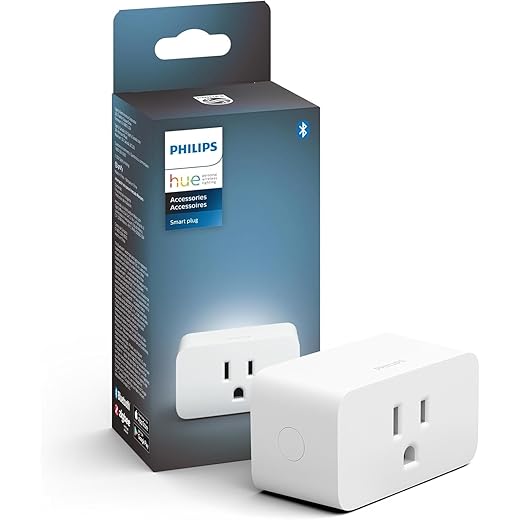
Philips Hue Smart Plug, White - 1 Pack - Turns Any Light Into a Smart Light - Control with Hue App - Compatible with Alexa, Google Assistant, and Apple HomeKit
As you become more comfortable with your Z-Wave setup, you can start adjusting the routines and progфramming specific actions. Many users find great pleasure in experimenting with different settings to discover what makes their home more functional and enjoyable. Whether you’re away on vacation or just want to improve the ambiance at home, automation with Z-Wave technology allows you to make these changes without permanent modifications.
Choosing the Right Z-Wave Hub
In today’s world of smart home technology, choosing the right Z-Wave hub can have a profound impact on how your whole house operates. This centralised system acts as the brain of your smart home, allowing various devices–from lights and locks to kitchen gadgets–to communicate seamlessly. To find a solution that best meets your family’s goals, it’s crucial to do your research and understand the options available.
When looking for a Z-Wave hub, keep in mind the importance of compatibility with various manufacturers. The wider the range of compatible hardware, the better your system will function. Look for hubs that are designed to automatically integrate with multiple devices and provide software updates over the years. Some compelling options on Amazon, such as the Samsung SmartThings Hub or the Aeotec Smart Home Hub, offer the flexibility and features needed for a robust smart home experience.
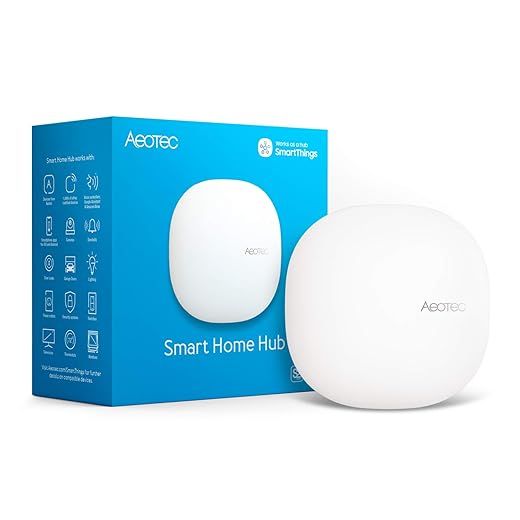
Aeotec Smart Home Hub, Works as a SmartThings Hub, Z-Wave, Zigbee, Matter Gateway, Compatible with Alexa, Google Assistant, WiFi
Consider the size of your house and the number of devices you plan to connect. A larger house may require a more powerful hub capable of operating a mesh network, which uses battery-operated devices to extend the range and ensure strong signals throughout the home. This way, even devices placed farther away from the hub, like triggers in the kitchen or front door, would remain accessible and functional.
Not only does the appropriate hub improve connectivity, but it also enhances the whole operation of your smart home. For example, certain hubs allow you to adjust settings manually or through voice commands, making everyday tasks simpler and more efficient. This level of control can facilitate a greater understanding of your home and its needs, ensuring you are informed about the effects of automation on your daily life.
Ultimately, no matter your starting point, choosing the right Z-Wave hub today will lay a solid foundation for your smart home journey. With the right technology in place, you can create a more intelligent living space that works for you and your family, keeping you connected and comfortable for years to come.
Step-by-Step Installation Guide
Installing a smart home system can be an exciting journey, especially for beginners. This guide focuses on helping you set up a basic system that takes your lifestyle to the next level, without feeling overwhelmed. The process usually includes a few critical components: smart switches, controllers, and utility strips, which allow you to manage your devices wirelessly.
Before diving into the installation, it’s essential to research the compatibility of your devices. Make sure that your chosen smart switches, like the TP-Link Kasa Smart Wi-Fi Light Switch, work well with your existing systems. These switches are not only reliable but also designed to seamlessly integrate into your setup. If you’re unsure about the intricacies, don’t hesitate to reach out to experts or consult product reviews.

Kasa Smart Light Switch HS200, Single Pole, Needs Neutral Wire, 2.4GHz Wi-Fi Light Switch Works with Google Home, UL Certified, No Hub Required, White
Once you’ve selected your products, let’s examine how to install them. Begin by turning off the power supply to avoid any accidents. After that, follow the manufacturer’s instructions to install your smart switches. For instance, the Leviton Decora Smart Switch is often recommended for its powerful functionality and ease of use. Once installed, you can connect them to your smartphone, allowing you to control your lights remotely.

Next, consider adding a repeater if your home is larger or has areas where the signal may be weak. A reliable device like the TP-Link RE650 AC2600 Wi-Fi Range Extender can help expand the wireless coverage, ensuring your automations run smoothly everywhere. After installation, monitor the functionality of your new devices and make adjustments as necessary. These additional steps can save you on energy bills while also creating a more compelling smart home experience.

Finally, remember that the best smart home systems are the ones that cater to your specific needs. By following this guide and selecting the right products, you can create an ecosystem designed for your utility and lifestyle, allowing you to enjoy powerful home automation effortlessly.
Questions and answers:
What are the basic components needed for setting up a smart home?
To create a smart home, you’ll need several fundamental components. First, you’ll need a central hub or controller that connects to all your smart devices. Typically, this can be a smart speaker or a dedicated home automation hub. Secondly, you will require smart devices, such as smart bulbs, plugs, thermostats, security cameras, and locks. Each device usually connects via Wi-Fi or Zigbee, so ensuring reliable internet connectivity is also important. Lastly, a smartphone app for controlling these devices is necessary, allowing you to manage everything from your mobile device from anywhere.
How do I ensure the security of my smart home devices?
Securing your smart home is crucial to protect your privacy and personal data. Start with changing the default usernames and passwords of your devices. Use strong, unique passwords for each device and your Wi-Fi network. Regularly update device firmware to fix vulnerabilities, and consider setting up a separate Wi-Fi network for your smart devices to isolate them from your main network. Additionally, enable two-factor authentication where possible, and consider using a password manager to keep track of your credentials. Monitoring and reviewing your device settings periodically also helps in maintaining security.
Can I integrate different brands of smart devices in my home?
Yes, many smart home devices from different brands can be integrated, but this often depends on compatibility and standards. Look for devices that support common protocols like Zigbee, Z-Wave, or Wi-Fi. Using a compatible hub can help bridge communication between various brands. Smart home ecosystems, such as Google Assistant, Amazon Alexa, or Apple HomeKit, support a range of third-party devices, enabling control of multiple brands through a single interface. Before purchasing devices, it’s wise to check compatibility with your existing setup.
What are the benefits of automating my home?
Automating your home can provide several advantages. First, it offers convenience, allowing you to control various aspects of your home with your smartphone or voice commands. This can make day-to-day tasks easier, like adjusting the temperature or turning off lights. Additionally, automation can enhance energy efficiency by allowing smarter use of devices based on your habits, potentially lowering utility bills. Automated security systems also contribute to peace of mind, providing alerts and monitoring even when you’re away. Lastly, smart homes can improve accessibility for those with mobility challenges, making everyday living more manageable.
What is the cost associated with building a smart home?
The cost of building a smart home can vary greatly depending on your preferences and the devices you choose. For a basic setup, you might spend anywhere from a few hundred to a couple of thousand dollars. Smart bulbs and plugs can be relatively inexpensive, while more advanced devices like smart thermostats, security cameras, and home automation hubs can increase the total significantly. Installation costs can also add to your budget, especially for more complex systems. It’s recommended to start small and gradually build your setup over time, focusing on the devices that best meet your needs and budget.


